In the spirit of learning, I finally decided to get my builder hands into Resend. The best use case in my current builder phase was adding a "get a weekly email of fresh thoughts" on the thesambrain.com.
As a marketer, I thought through:
non invasive "subscribe" placement
unsubscribe functionality
reply ability (rn just forwards to my personal email)
email structure
scheduler automation
And, boy, did I have a lot of fun with Resend and Laravel Cloud just now!
Reasoning with Claude
Before I actually had my agent go build all this, I spent a little bit of time reasoning and understanding with Claude. I talked through specifics like:
what I wanted the CTA to say
when you clicked it, what happened next (a popup module with a simple email input field)
how it would round up emails weekly. For example: only the folders in the weekly email where I actually added some thoughts. Simple header with bulleted hyperlinks nested below
the subject line
the from name, and from email
made sure to specify I was going to use Resend
I think because I spent a minute explaining exactly what I was hoping for, this build went pretty dang fast. It allowed me to finesse my placement and wording later on versus find a bug, fix the bug, commit, push, deploy, yada yada.
Building the email functionality
Once the UI was all in for the "subscribe," this is where I knew I didn't know what to do on my own. I had Claude walk me through, very simply, how to get Resend up and running.
Resend set up was so stinkin' easy it honestly took me like...two minutes tops. I've only done minimal DNS work but between Resend UI and Claude step-by-step instructions, boom. It took longer to verify in Resend than it did for me to actually configure it all in the DNS.
Deploying on Laravel Cloud
This was also another step I was very nervous but excited to learn how to do. I knew Resend needed to talk to Laravel Cloud somehow! Honestly, another, "ok, wow, this is easier than I thought it'd be" moment.
Resend + Claude made it very simple for me to get it all talking to each other. It was a quick:
Copy/paste these keys there
Turn on "Scheduler" in your app environment
Deploy
Pretty easy if you ask me. (and I'm really not that technical!)
Too tested to be stressed
Once I got it all built and configured, I had to test it. It was pretty neat I could run this command in Cloud: php artisan blog:send-digest
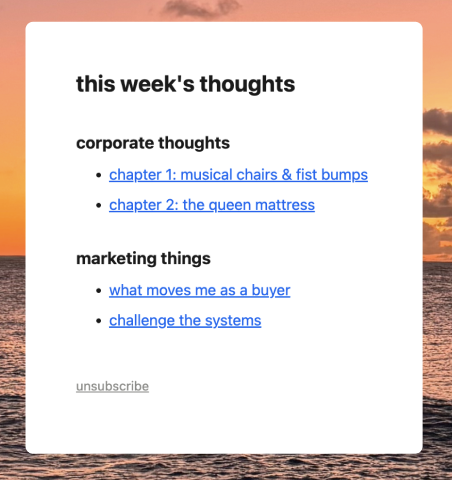
The email hit my promotional folder in my inbox which was unsettling. Again, as a marketer, that's no fun. So I asked Claude what we could do to make that less likely to happen. It suggested:
added a
List-Unsubscribeheader. The same signal real mailing list tools use, so Gmail treats the sender as more legitimate instead of guessing.set up a real reply-to inbox (
hi@thesambrain.com, forwarding to my personal email) instead of a dead-end no-reply address.
There's no guarantee that thesambrain weekly thought drop won't hit spam or promotional folders, but, hey. We did what we could.
Very excited I finally got into Resend! I'm an email girlie, so I'm excited to see where these builder skills will take me next.